Notebook Name Label Sticker5: A Practical Choice for Back-to-School Organization
Back-to-school season brings a quiet but persistent need: clear, consistent identification for notebooks and books. Whether you’re a parent prepping for kindergarten or a teacher managing a classroom set of resources, name labels reduce loss, simplify sorting, and support routine. The Notebook Name Label Sticker5 is one option designed specifically for this purpose—offering a balance of customization, ease of use, and functional sizing.
What Exactly Is Notebook Name Label Sticker5?
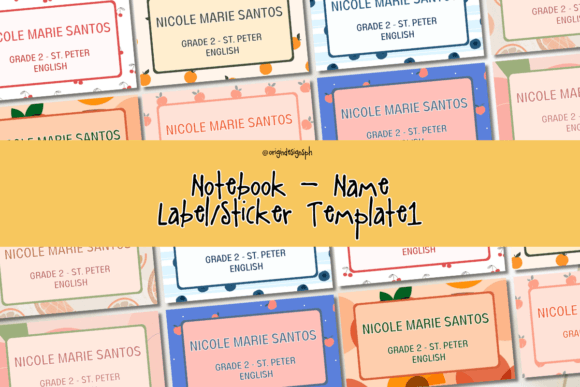
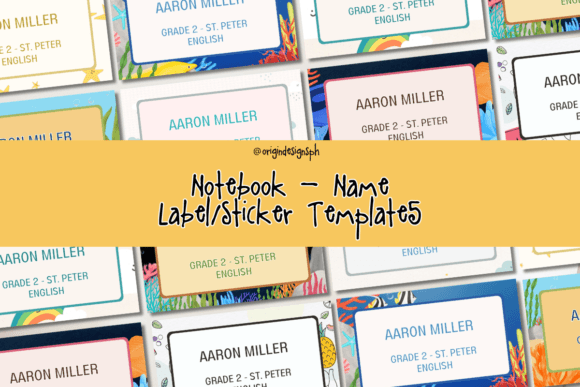
The Notebook Name Label Sticker5 is an editable, printable Canva-based template pack containing 10 distinct label designs—all sized at 5 x 3 inches. It’s not a physical product shipped to your door; it’s a digital file you download, personalize, print, and apply. Each design maintains the same dimensions, allowing for consistency across notebooks, binders, reading logs, and textbooks.
Unlike static PDFs or pre-printed sticker sheets, this template lives inside Canva—meaning you can adjust fonts, colors, names, and layout elements without needing graphic design software. No subscription is required to edit it, though a free Canva account is necessary. Once edited, you can print on standard sticker paper (matte or glossy), plain cardstock, or even label stock compatible with home printers.
How It Compares With Other Labeling Approaches
Labeling solutions fall into three broad categories: pre-made physical stickers, fully editable digital templates, and handwritten or DIY methods. The Notebook Name Label Sticker5 sits firmly in the second group—but with specific tradeoffs worth noting.
Pre-printed stickers offer speed and durability—many are laminated or waterproof—but lack flexibility. If your child changes schools, switches grade levels, or simply prefers a new color scheme mid-year, those stickers aren’t adaptable. In contrast, the Notebook Name Label Sticker5 supports iterative updates: tweak a name, swap a font, or test a layout before printing a full sheet.
Handwritten labels—using masking tape, index cards, or permanent markers—are low-cost and immediate, but they rarely scale well. Teachers labeling 25+ notebooks face legibility fatigue and inconsistency. Digital templates like the Notebook Name Label Sticker5 help maintain uniformity while reducing manual effort over time.
Other editable templates exist—some built in PowerPoint, Google Slides, or Illustrator—but Canva integration lowers the technical barrier. You don’t need to understand layers, bleed margins, or CMYK color modes. That accessibility makes the Notebook Name Label Sticker5 especially practical for users who value simplicity over granular control.
Strengths and Real-World Fit
The most notable strength of the Notebook Name Label Sticker5 is its focused utility. At 5 x 3 inches, each label provides ample space for a child’s full name, grade, and teacher—or just a clean first name and icon. That size avoids the cramped feel of tiny address-style stickers while staying compact enough to fit along the spine or front cover of most standard notebooks.
It also supports dual-use scenarios. Parents can personalize labels for their own children—and teachers or small business owners can adapt them for resale. The license explicitly permits printing and selling the finished physical labels (not the editable file itself). This matters if you run a local stationery shop, craft fair booth, or Etsy listing for school prep kits. You retain full rights to distribute printed versions, which isn’t always true with other Canva-based templates.
In practice, users report success applying these labels to composition notebooks, spiral-bound journals, library books, and even water bottles—though adhesion depends on the sticker paper used, not the template itself.
Limitations to Keep in Mind
The Notebook Name Label Sticker5 doesn’t include QR codes, barcodes, or contact information fields—features some educators request for lost-and-found systems. It also doesn’t support variable data printing (e.g., auto-populating names from a spreadsheet), so bulk personalization still requires manual entry per label.
Because editing happens inside Canva, offline access is limited. You’ll need internet connectivity to open and modify the file unless you export a static version first. And while Canva offers robust typography options, advanced typographic controls—kerning adjustments, custom ligatures, or OpenType features—are unavailable.
Finally, the single-size format means it won’t suit every surface. Smaller notebooks (like pocket-sized journals) may feel overwhelmed by a 5 x 3 inch label, while larger binders might benefit from something wider or taller. There’s no built-in resizing guidance—users must manually scale within Canva, which can affect text legibility if done imprecisely.
When Notebook Name Label Sticker5 Makes Sense—And When It Might Not
This template works best when you prioritize design control, print-on-demand flexibility, and moderate volume. For example:
- A homeschool parent preparing materials for two children across different subjects—able to reuse the same template with varied colors and fonts per child.
- A PTA volunteer organizing a school supply drive and offering personalized notebook kits—including printed labels as part of the package.
- A small educational content creator bundling printable resources and wanting to add branded, name-ready labels without outsourcing design work.
It’s less ideal for high-volume institutional use—say, labeling 200+ notebooks for a district-wide rollout—where automated data merging or vendor-managed printing would save more time than editing inside Canva. Similarly, if durability is non-negotiable (e.g., for outdoor science notebooks or PE bags), you’d still need to pair the template with weather-resistant sticker stock—a factor separate from the design itself.
Practical Tips for Getting the Most From It
To maximize effectiveness with the Notebook Name Label Sticker5:
- Test print first. Use plain paper to check alignment, spacing, and readability before committing to sticker sheets.
- Choose adhesive wisely. Removable vinyl works well for temporary placement; permanent matte finish holds up better on textured covers.
- Standardize placement. Apply all labels in the same location (e.g., top-right corner of the front cover) to build visual consistency across materials.
- Batch edits. If labeling multiple children or students, duplicate pages inside Canva rather than re-editing the same canvas repeatedly.
- Store backups. Download a PDF version after finalizing each set—especially if sharing printed copies with others.
None of these steps require technical expertise, but they do reflect how the Notebook Name Label Sticker5 functions as a tool—not a plug-and-play solution. Its value emerges through thoughtful implementation, not automatic convenience.
Making a Grounded Decision
There’s no universal “best” notebook label system. What works for a Montessori preschool may differ from what suits a middle school language arts department. The Notebook Name Label Sticker5 stands out for its clarity of scope: it delivers exactly what its name suggests—five-inch-by-three-inch name labels, editable in a familiar interface, usable across personal and small-business contexts.
If your priority is rapid iteration, visual cohesion, and ownership over the final printed output, it’s a sound choice. If you need automation, scalability beyond dozens of units, or specialized functionality like scannable identifiers, exploring dedicated labeling software or print-service partnerships may better align with your goals.
Ultimately, back-to-school preparation isn’t about perfection—it’s about reducing friction, supporting independence, and building systems that last beyond the first week of class. The Notebook Name Label Sticker5 contributes to that goal in a modest, reliable, and quietly adaptable way.