KIDS Preschool Pencil Control Worksheet
The KIDS Preschool Pencil Control Worksheet is a purpose-built, print-ready resource designed to support early childhood development—specifically the foundational fine motor and pre-writing skills that precede formal handwriting instruction. It’s not a generic coloring page or isolated activity sheet. Rather, it functions as a structured, sequential tool within a broader early literacy and motor development workflow—used by educators preparing classrooms, parents building home learning routines, creators developing supplemental educational content, and publishers scaling KDP-based activity book catalogs.
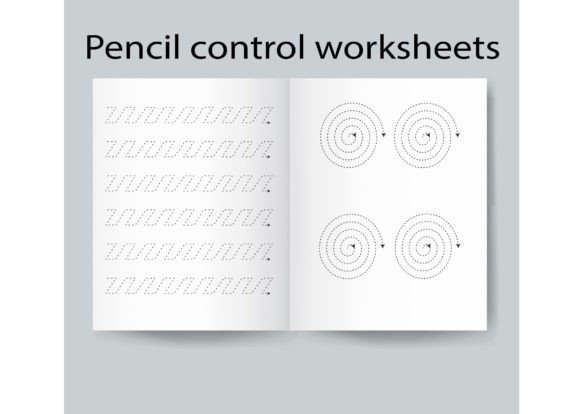
This tracing book targets children from late toddlerhood through kindergarten (ages 3–6), focusing on controlled line work, curve navigation, shape replication, and grip consistency. Its 17-page structure follows developmental logic: simple straight lines → angled paths → rounded forms → compound shapes → light-to-firm pressure progression. Each page builds muscle memory and spatial awareness—not just “tracing for tracing’s sake,” but tracing with intention, feedback, and measurable progress.
Where It Fits in Real Workflows
For educators, the KIDS Preschool Pencil Control Worksheet integrates into lesson planning as a low-prep, high-impact station activity. It works before direct instruction (as a warm-up to activate hand muscles), during small-group rotations (paired with verbal modeling or peer observation), or after a writing demonstration (as independent reinforcement). Because it’s formatted at 8.5 x 11 inches and includes both PDF and source files (EPS, PNG, JPEG), teachers can easily extract individual pages for laminated dry-erase use, project them onto interactive whiteboards, or adapt them for digital annotation tools like Kami or Seesaw.
For creators and KDP publishers, this worksheet isn’t just an end product—it’s a modular asset. The inclusion of layered, high-resolution source files means you can repurpose elements across formats: extract vector curves for animated handwriting demos, convert traced shapes into SVG icons for web-based learning dashboards, or recombine pages into themed bundles (e.g., “Back-to-School Fine Motor Kit” or “Pre-K Summer Readiness Pack”). Its print-ready PDF ensures zero formatting surprises during KDP upload—no bleed adjustments, no font embedding issues, no resolution warnings. That saves time in quality control and reduces revision cycles before launch.
For parents and homeschoolers, the worksheet supports consistency without demanding expertise. There’s no need to design daily drills or interpret developmental milestones on the fly. The sequence itself guides pacing: if a child masters zigzag tracing on page 4, they’re likely ready for diagonal lines on page 6. The physical dimensions allow for standard binders or clipboards—making it portable for car rides, waiting rooms, or therapy sessions. And because each shape appears multiple times across varied orientations, repetition feels organic, not rote.
Integration With Other Tools and Resources
This worksheet doesn’t operate in isolation. It pairs naturally with several common classroom and home tools:
- Triangular pencils or pencil grips: The worksheet’s line thickness and spacing are calibrated for standard preschool-sized writing tools—meaning grip training happens alongside tracing, not separately.
- Multi-sensory materials: Trace over printed lines with Wikki Stix, glue sticks, or sandpaper cutouts to reinforce tactile feedback before moving to pencil-only practice.
- Digital companions: Use the included PNGs to build custom flashcards in Canva or Anki; import EPS vectors into Cricut Design Space for cut-and-trace manipulatives.
- Assessment frameworks: Align page completion with widely used benchmarks like the Peabody Developmental Motor Scales (PDMS-2) or state-specific early learning guidelines—particularly domains related to visual-motor integration and manual dexterity.
It also interfaces cleanly with curriculum mapping. If you’re using Creative Curriculum, HighScope, or ECERS-R, the worksheet maps directly to indicators under “Approaches to Learning” and “Physical Development.” For publishers building aligned series, its clean layout and consistent visual hierarchy make it easy to maintain brand cohesion across companion titles—like matching number formation or letter tracing workbooks.
Practical Implementation Tips
Start with observation, not assignment. Before handing a child the worksheet, watch how they hold a pencil for 30 seconds during free drawing. Note finger placement, wrist angle, and fatigue points. Then choose the first 2–3 pages that match their current capacity—not what’s “next” in sequence. Skipping ahead rarely accelerates progress; targeted repetition does.
Use the source files intentionally. Don’t just upload the PDF and call it done. Open the EPS file in Illustrator to adjust stroke weight for older kindergarteners needing finer control, or invert colors in Photoshop to create high-contrast versions for children with visual processing needs. These small edits extend usability without redesigning from scratch.
Build in reflection—not just repetition. After tracing, ask: “Which shape felt easiest? Which one made your hand tired?” This turns motor practice into metacognitive habit-building. For older users (e.g., occupational therapy aides), document responses in a simple log to track endurance and preference shifts over time.
Rotate usage across contexts. Use one page as a morning warm-up, another as a transition activity between subjects, and a third as a quiet focus task during group work. Varying the *when* and *why* prevents habituation and reinforces transfer—so pencil control becomes automatic, not situational.
Long-Term Use and Quality Considerations
Because the KIDS Preschool Pencil Control Worksheet delivers both immediate utility and long-term flexibility, durability and adaptability matter more than novelty. The 17-page count avoids overwhelm while providing enough variation to sustain interest across weeks—not days. Its grayscale-friendly design keeps printing costs low for bulk classroom use, and the absence of clipart clutter ensures clarity for neurodiverse learners.
From a production standpoint, the inclusion of multiple file types eliminates bottlenecks. Need a single page for a newsletter insert? Pull the JPG. Building a website with downloadable resources? Serve the optimized PNG. Preparing for offset printing? Rely on the CMYK-ready PDF. This cross-format readiness means less time converting, testing, and troubleshooting—and more time delivering value.
Finally, consider version control. Save your edited EPS files with clear naming (e.g., “PencilControl_v2_ShapeVariants”) and archive original sources separately. As your audience grows—whether it’s a school district adopting your materials or a blog audience requesting adaptations—you’ll want traceable, editable assets—not flattened PDFs you can’t modify.
The KIDS Preschool Pencil Control Worksheet succeeds not because it’s “fun” in a superficial sense, but because it respects the process: the slow, observable, repeatable progression from uncontrolled mark-making to intentional line work. That makes it equally valuable whether you’re scaffolding a child’s first written word—or building a scalable, standards-aligned educational product line.